


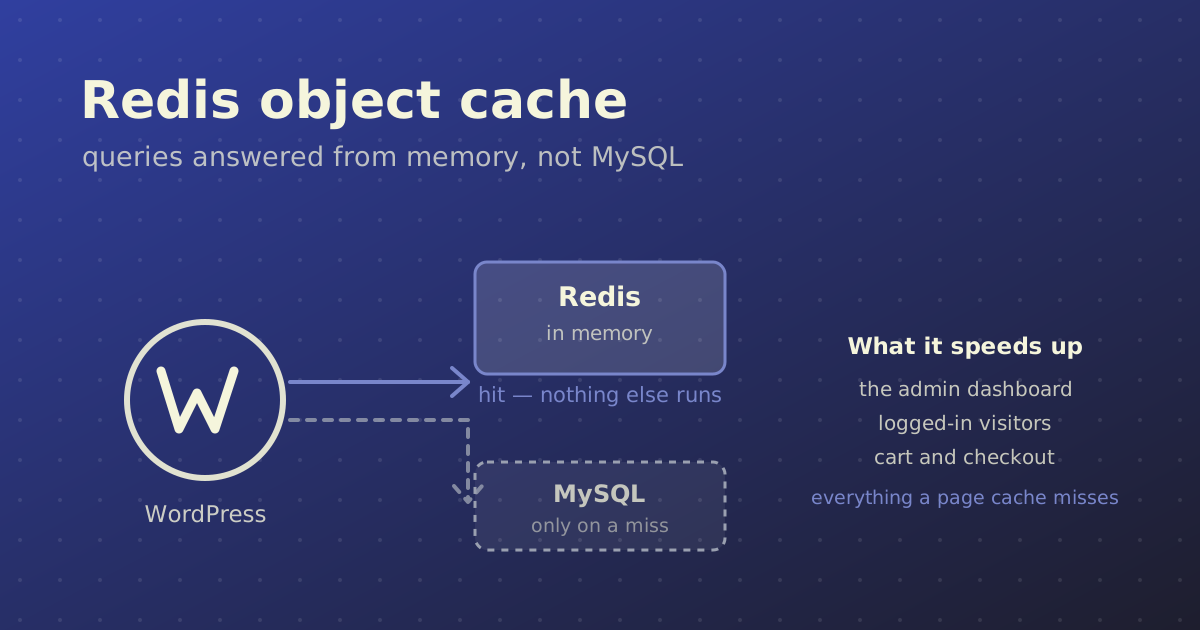
A persistent object cache stores the results of WordPress's database queries in memory and keeps them between requests, so the same query does not hit MySQL again on the next page load. Redis is the usual tool for it. The gain is fewer database queries, faster page generation and a site that holds up better under load — and unlike full-page caching, it also speeds up pages you cannot cache, such as the admin and anything behind a login.
It is not worth adding everywhere. Here is how it works, when it pays for itself, and how to set it up.
WordPress Already Has an Object Cache
This part surprises people. WordPress has had an object cache since version 2.0 — it is just not persistent.
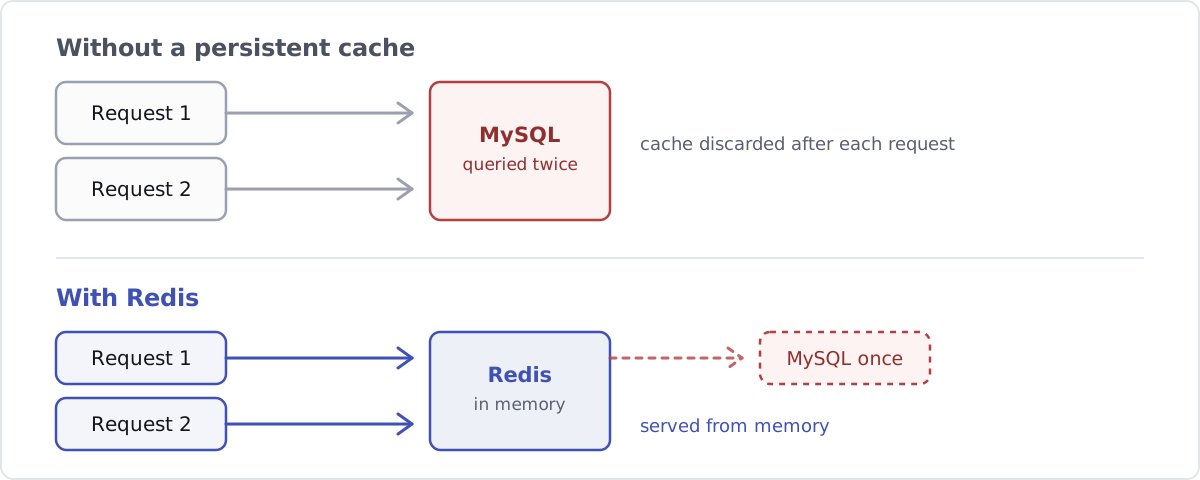
During a single page request, WordPress stores the things it looks up (options, posts, terms, user meta) in memory so it does not fetch them twice. The moment the page is served, that memory is discarded. The next visitor arrives and WordPress rebuilds the whole lot from MySQL again, running the same queries it ran a second ago.
A persistent object cache swaps that throwaway store for one that survives between requests.
Page Cache and Object Cache Are Not Alternatives
A common mix-up worth settling, because the two solve different problems:
| Page cache | Object cache | |
|---|---|---|
| What it stores | The finished HTML of a page | Individual query results and objects |
| Who it helps | Logged-out visitors | Everyone, including logged-in users |
| Admin dashboard | No help at all | Helps a lot |
| Cart, checkout, account | Must be excluded | Still cached |
| Typical tool | LiteSpeed Cache, WP Fastest Cache | Redis, Memcached |
They stack. A page cache serves anonymous visitors without touching PHP at all; the object cache speeds up everything that gets past it.
When a Persistent Object Cache Is Worth It
- WooCommerce stores. Cart, checkout and account pages cannot be page-cached, so every one of those requests runs PHP and hits the database. This is the single strongest case.
- Membership sites, LMS platforms and forums. Anywhere most traffic is logged in, a page cache is mostly bypassed and the object cache does the real work.
- Plugin-heavy sites, or a bloated
wp_optionstable. Autoloaded options are read on every request; plugins that run dozens of queries per page compound it. - High-traffic sites where the database is the bottleneck. If MySQL is the thing running hot, cutting query volume helps more than anything on the PHP side.
- When WordPress tells you. Site Health raises a recommendation when it detects the site would benefit — worth taking seriously rather than dismissing.
When It Is Not Worth It
- A small brochure site or blog with a working page cache. Most visitors are served cached HTML and never reach the database. You would be optimising a path almost nobody takes.
- Shared hosting with tight memory limits. Redis either is not available, or it is and gets starved of RAM — at which point it evicts constantly and you have added a moving part for nothing.
If you are unsure which group you are in, measure before you install anything. The honest test is how many requests actually reach PHP, not how many pages the site has.
Setting Up Redis
Option 1: Let your host do it
Many managed WordPress hosts, and panels like RunCloud and Cloudways, expose Redis as a one-click toggle. If that is on the table, take it — you skip the server work and the host keeps it patched.
Option 2: On your own VPS
Install the server and the PHP extension, then restart PHP-FPM so it picks the extension up:
sudo apt install redis-server php-redis
sudo systemctl restart php8.3-fpm
Then give Redis a memory ceiling and an eviction policy in /etc/redis/redis.conf, so it can never eat the RAM your database and PHP workers need:
maxmemory 256mb
maxmemory-policy allkeys-lru

# Keep it on the loopback interface. Redis has no business
# being reachable from the internet.
bind 127.0.0.1 ::1
allkeys-lru means that when Redis fills up it discards the least recently used keys rather than returning errors. That is the behaviour you want for a cache: losing a cached value is harmless, because WordPress just rebuilds it.
A Unix socket is slightly faster than TCP on a single box, and removes the network surface entirely. If you use one, point WordPress at it with WP_REDIS_SCHEME and WP_REDIS_PATH instead of host and port.
Option 3: With Docker
Run Redis as its own service alongside WordPress and address it by service name:
services:
  wordpress:
    image: wordpress:php8.3-fpm
    environment:
      WORDPRESS_CONFIG_EXTRA: |
        define( 'WP_REDIS_HOST', 'redis' );
  redis:
    image: redis:7-alpine
    command: redis-server --maxmemory 256mb --maxmemory-policy allkeys-lru
Note there is no published port on the Redis service. Containers on the same network reach it by name; nothing outside needs to.
Connecting WordPress to Redis
Installing Redis does nothing on its own — WordPress has to be told to use it.
Install Redis Object Cache by Till Krüss (over 500,000 active installs), then press Enable Object Cache on its settings screen. That drops an object-cache.php file into wp-content/, which is the mechanism WordPress uses to swap its built-in cache for an external one.
Then configure the connection in wp-config.php, above the /* That's all, stop editing! */ line:
define( 'WP_REDIS_HOST', '127.0.0.1' );
define( 'WP_REDIS_PORT', 6379 );
define( 'WP_REDIS_DATABASE', 0 );

// Namespaces this site's keys. Essential when several sites
// share one Redis server, or they will read each other's cache.
define( 'WP_CACHE_KEY_SALT', 'example.com:' );
The salt is the step people skip, and it bites. If two sites share a Redis instance without unique salts, they write to the same keys — and one site starts serving another site's options and user data. Give each site its own WP_CACHE_KEY_SALT, a separate WP_REDIS_DATABASE number, or both.
For larger or busier installations there is Object Cache Pro, a paid commercial product that the free plugin's own page describes as a business-class rewrite of it. Worth looking at once a site is big enough that cache reliability is a revenue question rather than a performance one.
Verifying It Actually Works
Installing it and assuming is how people end up with a disabled cache for six months. Three checks:
- The plugin's status screen. It reports whether it is connected, and the hit rate. A healthy site sits well above 90%.
- Tools → Site Health. The "persistent object cache" recommendation should have disappeared.
- Query Monitor by John Blackbourn. Load a page before and after, and compare the database query count in the admin bar. On a plugin-heavy site the drop is usually obvious — often a third or more.
If the hit rate is low or the query count barely moved, the cache is probably connected but being flushed constantly, or the site is generating unique cache keys on every request. That is a real bug worth chasing, not something to live with.
Frequently Asked Questions
Do I still need a page cache if I have Redis?
Yes. They do different jobs. A page cache serves finished HTML to logged-out visitors without running PHP at all, which is always faster than generating the page from cached objects. The object cache speeds up everything the page cache cannot serve: the admin, logged-in users, carts and checkouts. Most well-tuned sites run both.
Redis or Memcached for a WordPress object cache?
For WordPress, either works and the performance difference is rarely the deciding factor. Redis is the more common choice because the tooling around it is better: the Redis Object Cache plugin is actively maintained and widely used, and Redis can persist to disk so a restart does not empty the cache. Pick whichever your host already supports well.
How much memory should I give Redis?
Start at 256MB for a typical site and watch the eviction count. If Redis is evicting keys constantly, raise it; if it never approaches the limit, you have room to spare. The important part is setting a limit at all, together with allkeys-lru, so a growing cache can never starve MySQL or your PHP workers of RAM.
What happens if Redis goes down?
The site keeps working. The Redis Object Cache plugin falls back to WordPress's built-in per-request cache, so pages still render — just with the database load you had before. It is worth monitoring Redis anyway, because a silent failure looks like the site simply getting slower.
Does an object cache help a site that is already fast?
Not much, if the speed comes from a page cache and most of your traffic is anonymous. Where it still helps is the part you experience rather than measure: the admin dashboard, bulk edits and WooCommerce order screens, none of which a page cache touches. If editors complain the backend is sluggish while the frontend scores well, that is the classic signal.
In Short
A persistent object cache is one of the better returns available on a busy WordPress site, and close to pointless on a quiet one. The question is not whether Redis is fast — it is how many of your requests actually reach the database. On a WooCommerce store or a membership site, that is most of them, and Redis is the right fix. On a five-page brochure site with a working page cache, it is a moving part you do not need.
If you want someone to work out which of those your site is, performance work and server setup is part of what I do.